I now talk to my AI agent as if it were a colleague at the next desk: no typing, no pressing send, and with a voice of its own. Within a few days, this became an open-source project: HermesVI.
The starting point: an agent team without a face
In my homelab, an entire team of AI agents works on the basis of Hermes Agent. Hermes runs in its own VM on my Proxmox server. The team's boss is Charlie, my “Chief of Staff”. He assigns tasks to specialists: Emilia handles email, Ingo looks after infrastructure, and there are other profiles too.
Charlie can do a lot. He has memory, skills and tools, including the terminal. But interacting with him was cumbersome. I used Matrix and Telegram to send him text or voice messages, then waited. To see what the team was doing, I had to check the Hermes dashboard or the log.
There were also a few constraints in the homelab:
- The same Proxmox system runs a Docker host with nginx as a reverse proxy; internal services have their own
*.landomains. - I have no spare IPv4 addresses left; external access is IPv6 only.
- When I am away, I access everything through NetBird, a WireGuard-based VPN.
The goal: eyes, ears and a mouth
I wanted to talk to Charlie as I would to a person. Just start speaking, interrupt him if he goes off track, and hear an answer without pressing a button. On my phone as well as my PC.
One thing mattered to me from the outset: this should not become a second orchestrator. Plenty of projects introduce their own agent system alongside the existing one. I wanted to keep using my Hermes team, with its memory and tools. The new app should simply be Charlie's eyes, ears and mouth.
That led to three requirements:
- The voice must be Charlie's own, not an arbitrary replacement voice.
- I want to see what the team is working on: tasks, the log and the tools Charlie is using at that moment.
- The app runs separately from Hermes, so I can maintain and update each independently.
Decisions along the way
I explored the ideas with Claude as a sparring partner, version by version. A few decisions shaped the project in particular.
Docker for the phone, a proper app for the PC. Initially, the plan was just a “talking website”. It soon became clear that a web app was ideal for the phone: running as a container on the Docker host and installable on the home screen. On the PC, though, I did not want to keep a browser tab open. So there is a second version as a Windows app that talks directly to Hermes without Docker. Since I also spend a lot of time working on Ubuntu and Linux Mint, a Linux version followed.
Hermes stays Hermes. HermesVI uses the API server and dashboard that Hermes already provides. It needs no plugin and no modifications to the agent. A few lines in the Hermes .env file are enough.
The voice. Speech output and recognition run through ElevenLabs, using the same voice Charlie has in Telegram and Matrix. Those who prefer local alternatives can use Whisper, Edge-TTS or the browser's voice.
The orb. There were several designs for the animation in the centre. The winner was a glowing core surrounded by rings, breathing while listening and pulsing while speaking.
The name. Internally, the project was called “Jarvis” for a long time. I felt that was too risky from a trademark perspective for a public release. It became HermesVI, short for Hermes Voice Interface.
Security first. A Hermes agent usually has full terminal access on its machine. Anyone who can give the agent commands can therefore do anything the agent can do. That is why we reviewed the code thoroughly twice. One finding particularly surprised me: Docker had also exposed the ports on public IPv6 addresses, bypassing the host firewall. Since then, HermesVI has listened only on the VPN address, and a password is mandatory.
The result: HermesVI
HermesVI is a voice and dashboard interface for Hermes. I simply start talking, Charlie replies in his own voice, and alongside the conversation I can see what the team is doing in real time.
On the PC, the screen is divided into three columns. Open Kanban tasks and the Hermes log are on the left. The orb and chat are in the centre. On the right, HermesVI shows the tools Charlie is currently using and the state of the system.
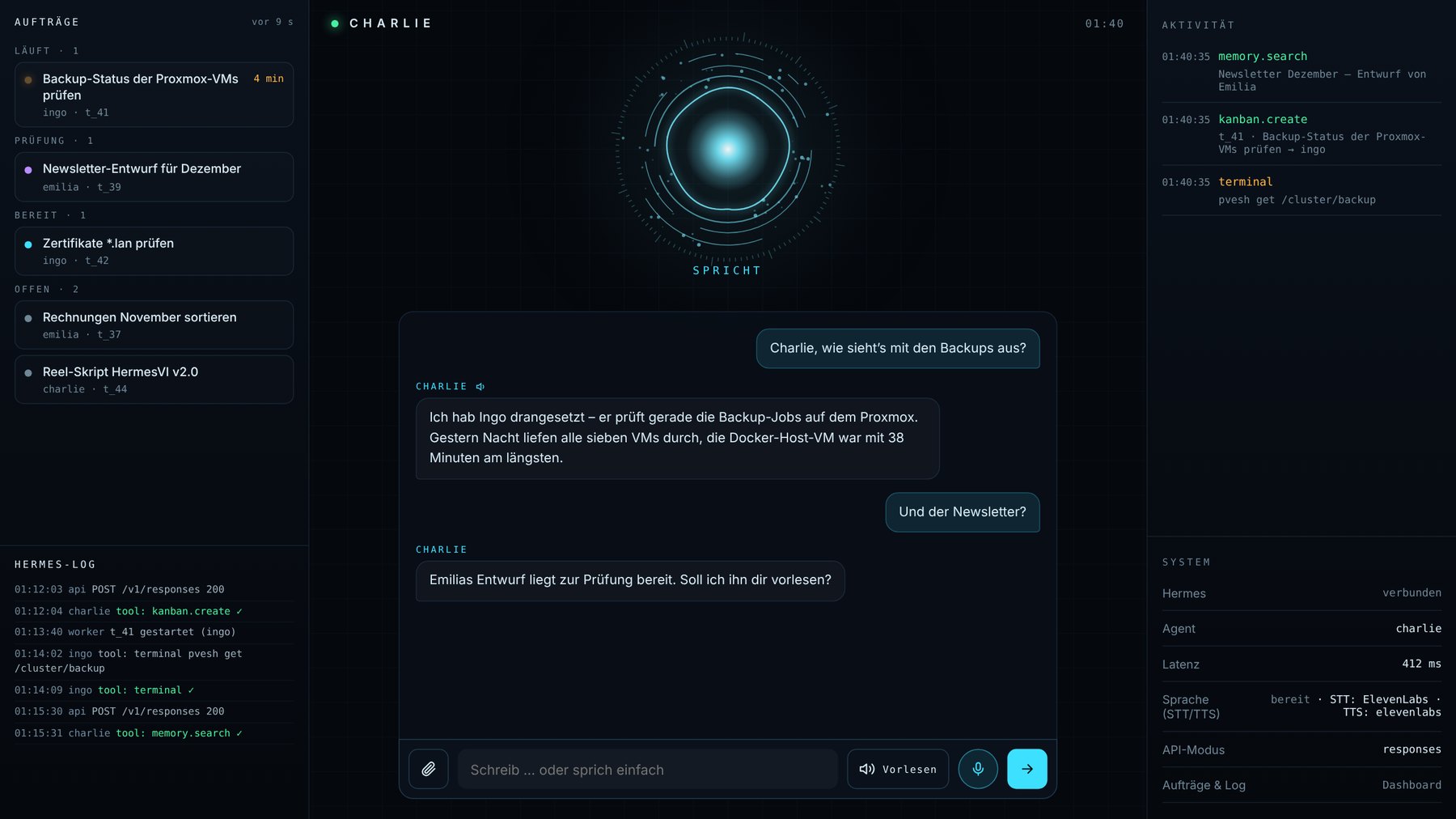
The desktop view: tasks and log on the left, orb and conversation in the centre, activity and system on the right (screenshot with example data).
On the phone, the orb fills the screen, with the response shown as subtitles below. Tapping the menu icon opens a panel with conversation history, activity, tasks, log and system information. I use it on my iPhone as a home-screen web app.
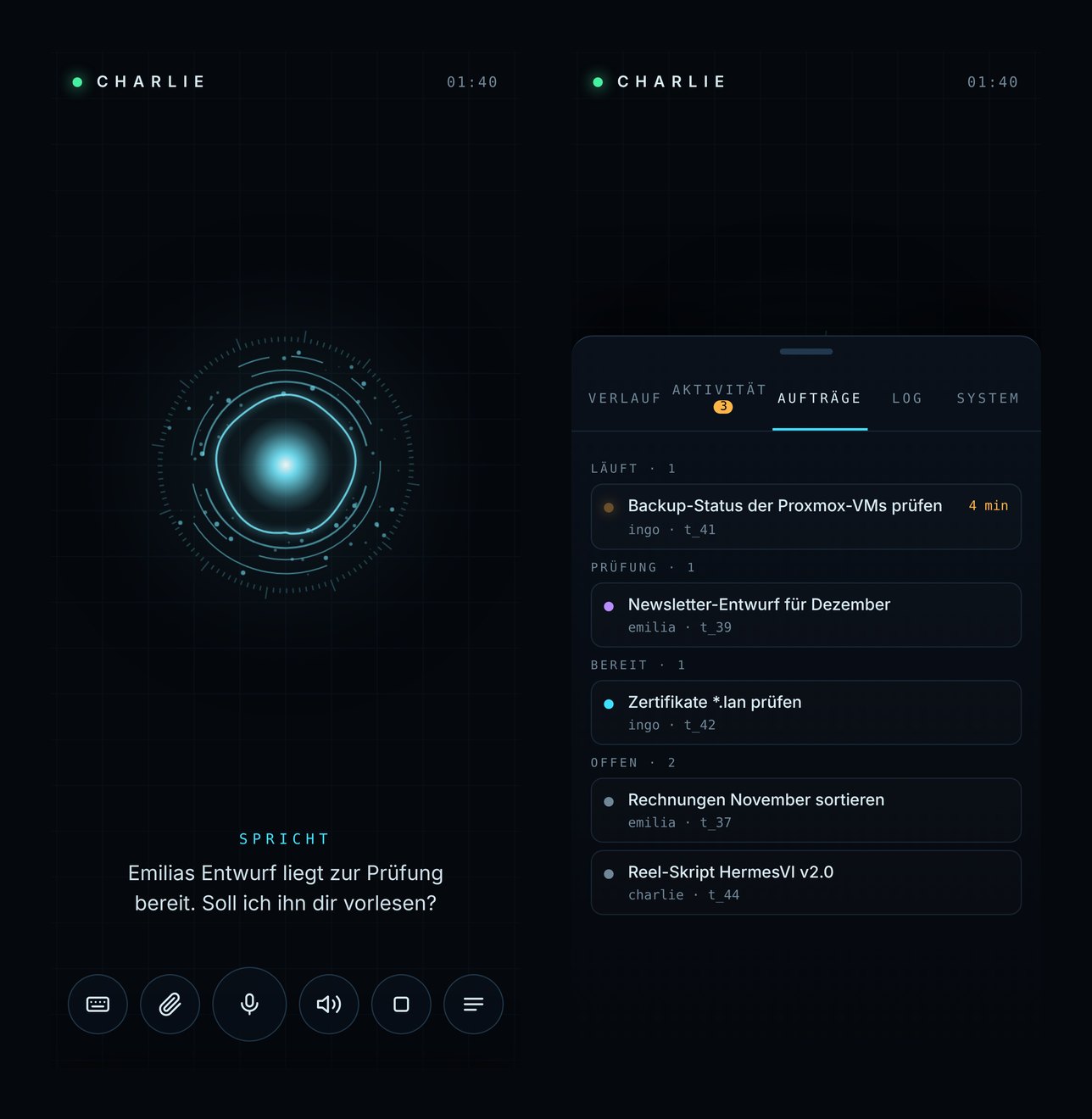
Left: Charlie speaking. Right: the panel with the team's tasks (screenshots with example data).
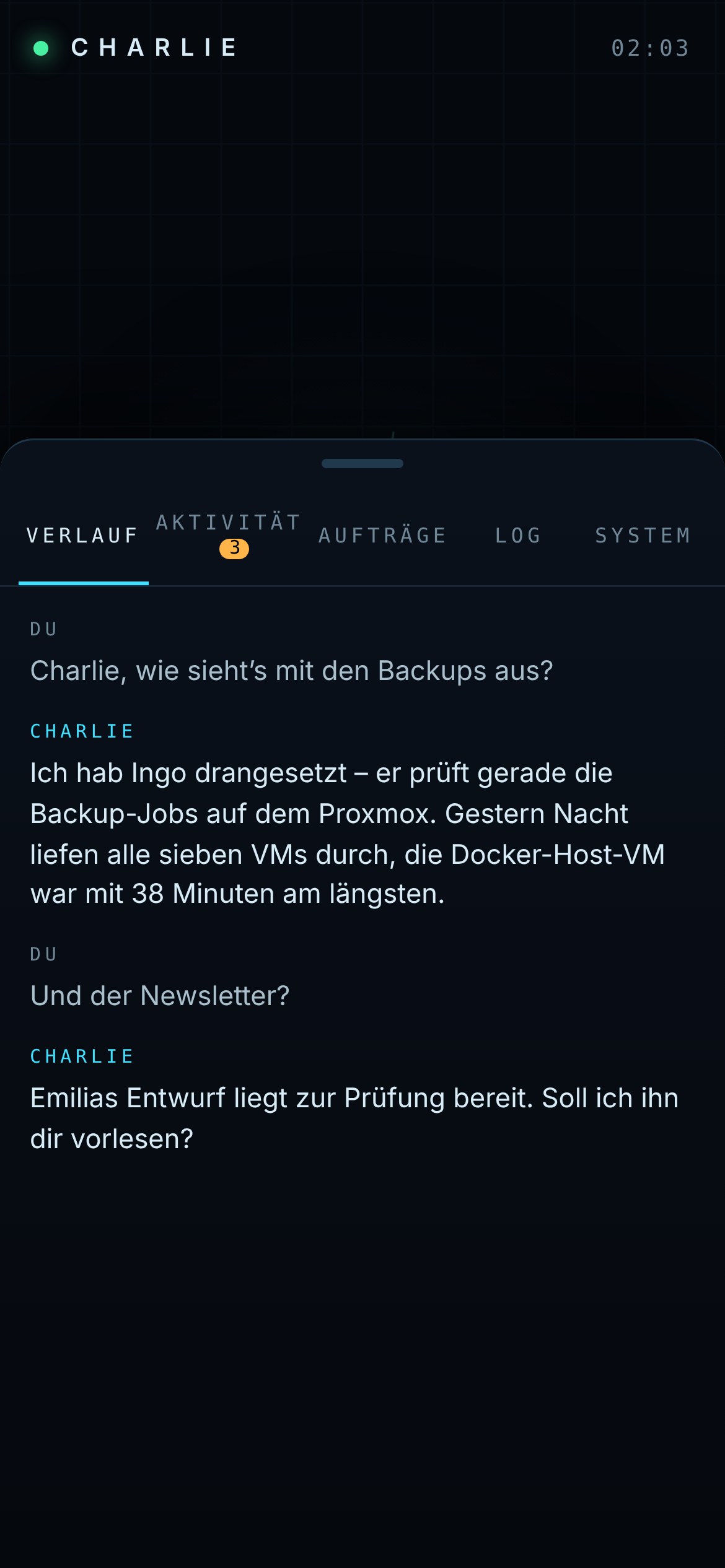
The conversation history in the phone layout, at full iPhone resolution (screenshot with example data).
Some of the features I use most day to day:
- Hands-free conversation: no pressing send, and speaking over Charlie interrupts him immediately.
- Photos and files: attach a photo and ask “What is this?”. The agent sees images directly; HermesVI extracts the text from Word, text and PDF files.
- Proactive notifications: when a task is completed, fails or becomes blocked, Charlie lets me know without being asked.
- Desktop extras: a system-tray icon, a keyboard shortcut for the microphone and automatic startup. Keys are stored encrypted in the user account.
Four days, eleven versions
The first public version was released on 23 November 2026; v2.0.0 followed four days later. In between, most changes were security fixes and everyday usability fixes that only emerged in real use.
| Date | Version | What changed |
|---|---|---|
| 27.11.2026 | v2.0.0 | New layout for all window sizes, stable Windows app, speaker button |
| 27.11.2026 | v1.3.2–1.3.5 | Layout fixes for narrow windows; Windows script failed because of line endings |
| 23.11.2026 | v1.3.1 | Second security review: listening only on the VPN, documents processed in an isolated process |
| 23.11.2026 | v1.3.0 | Send photos and files to the agent |
| 23.11.2026 | v1.2.3 | Ready-made Docker image on ghcr.io, updates with one command |
| 23.11.2026 | v1.2.2 | iPhone: microphone is properly released after switching apps |
| 23.11.2026 | v1.2.1 | Security update after a full code review; password becomes mandatory |
| 23.11.2026 | v1.2.0 | First public version under the HermesVI name, MIT licence |
The prerelease versions 1.0 and 1.1 had previously run only on my own system. Full details are in the changelog on GitHub.
Conclusion and what comes next
The goal is achieved: Charlie now has eyes, ears and a mouth, while my agent team remains unchanged. I talk to him on my PC or on my iPhone while away, and can see what Ingo and Emilia are working on at the same time. Above all, I learned one thing: with an agent that has terminal access, building the interface is the smaller part of the work; securing it is the bigger one.
HermesVI is open source under the MIT licence. Code, installation instructions and ready-made downloads for Docker, Windows and Linux are available on GitHub at ITCLucke/HermesVI. Anyone running Hermes Agent can connect it in a few minutes. Feedback and issues are welcome.
HermesVI is an independent community project and is not affiliated with Nous Research.